
UX Design Tips That Increase Sales: The Complete Guide for Businesses (2026)
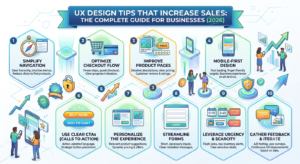
In today’s highly competitive digital marketplace, having a visually attractive website isn’t enough. Customers expect websites to be fast, intuitive, and effortless to use. That’s where UX Design Tips That Increase Sales become essential.
A well-designed user experience (UX) helps visitors find what they need quickly, builds trust, reduces friction, and encourages them to complete purchases. Whether you run an eCommerce store, SaaS platform, or service-based business, investing in UX can significantly improve your conversion rate.
In this comprehensive guide, you’ll learn the most effective UX Design Tips That Increase Sales that businesses should implement in 2026.
What is UX Design?
User Experience (UX) Design focuses on creating products, websites, and applications that provide meaningful and enjoyable experiences for users.
Good UX means:
- Easy navigation
- Fast loading pages
- Clear information
- Mobile-friendly layouts
- Simple checkout process
- Easy communication
When customers enjoy using your website, they’re more likely to trust your business and make a purchase.
Why UX Design Matters for Sales
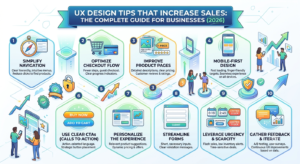
Businesses often spend thousands on advertising but lose potential customers because of poor website usability.
Research consistently shows that good UX leads to:
- Higher conversion rates
- Lower bounce rates
- Increased customer trust
- Better customer retention
- More repeat purchases
- Higher average order value
That’s why implementing UX Design Tips That Increase Sales should be part of every digital marketing strategy.
15 UX Design Tips That Increase Sales
1. Make Navigation Simple
Visitors should find products or services within seconds.
Best practices include:
- Clear menu labels
- Logical categories
- Search functionality
- Sticky navigation
- Minimal menu items
Confusing navigation causes users to leave before they even explore your offerings.
2. Improve Website Loading Speed
Speed directly impacts conversions.
Optimize by:
- Compressing images
- Using modern image formats
- Enabling browser caching
- Reducing unnecessary scripts
- Choosing reliable hosting
A slow website creates frustration and reduces sales opportunities.
3. Optimize for Mobile Users
More than half of web traffic comes from smartphones.
Your website should include:
- Responsive layouts
- Large clickable buttons
- Readable typography
- Fast mobile performance
- Mobile-friendly forms
One of the most important UX Design Tips That Increase Sales is designing mobile-first experiences.
4. Use Clear Call-to-Action Buttons
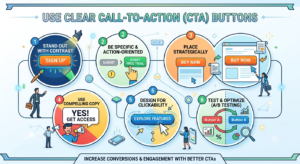
Your CTA should immediately tell users what to do.
Examples:
- Buy Now
- Get Started
- Request a Quote
- Book a Demo
- Download Free Guide
Make CTA buttons:
- Highly visible
- Easy to tap
- Action-oriented
- Consistent throughout the website
5. Reduce Checkout Friction
Many customers abandon carts because checkout is too complicated.
Improve checkout by:
- Allowing guest checkout
- Reducing form fields
- Showing progress indicators
- Offering multiple payment methods
- Displaying shipping costs upfront
A streamlined checkout directly increases completed purchases.
6. Build Trust with Social Proof
Customers trust other customers.
Include:
- Customer reviews
- Star ratings
- Testimonials
- Case studies
- Client logos
- Success stories
Trust signals reduce purchase anxiety.
7. Improve Website Readability
Content should be easy to scan.
Use:
- Short paragraphs
- Bullet points
- Headings
- White space
- Simple language
- Consistent fonts
Readable content keeps visitors engaged longer.
8. Keep Design Consistent
Consistency improves usability.
Maintain consistency across:
- Colors
- Typography
- Buttons
- Icons
- Layout
- Branding
Users feel more comfortable navigating familiar patterns.
9. Simplify Forms
Long forms discourage conversions.
Instead:
- Ask only essential questions
- Use autofill
- Show validation instantly
- Group related fields
- Add helpful placeholders
Short forms generate more leads.
10. Add Powerful Search Functionality
Visitors often know exactly what they want.
A great search feature should include:
- Auto suggestions
- Filters
- Category search
- Spelling correction
- Relevant results
This dramatically improves product discovery.
11. Highlight Product Benefits
Instead of only listing features, explain benefits.
Example:
Feature:
“5000mAh Battery”
Benefit:
“Enjoy all-day battery life without frequent charging.”
Benefit-driven messaging encourages purchasing decisions.
12. Use High-Quality Images
Professional visuals improve credibility.
Include:
- Multiple product images
- Zoom functionality
- Lifestyle photography
- Videos
- 360° product views
Quality visuals reduce uncertainty.
13. Personalize the User Experience
Personalization helps customers discover relevant products.
Examples:
- Recently viewed items
- Personalized recommendations
- Localized content
- Customized offers
- Dynamic homepage content
Personalization increases customer engagement and sales.
14. Remove Distractions
Avoid overwhelming visitors.
Reduce:
- Excessive popups
- Too many animations
- Unnecessary banners
- Cluttered layouts
- Complicated navigation
Clean interfaces improve focus and conversions.
15. Continuously Test and Improve
UX is never finished.
Regularly test:
- CTA colors
- Headlines
- Landing pages
- Checkout flow
- Navigation
- Product pages
Use A/B testing and analytics to identify what works best.
Continuous optimization is one of the most valuable UX Design Tips That Increase Sales.
Common UX Mistakes That Hurt Sales
Avoid these common issues:
- Slow loading pages
- Broken links
- Confusing menus
- Tiny mobile buttons
- Too many popups
- Long checkout process
- Poor product descriptions
- Low-quality images
- Hidden contact information
- Lack of trust badges
Fixing these problems can lead to noticeable improvements in conversion rates.
UX Design Trends for 2026
Businesses should pay attention to these emerging trends:
- AI-powered personalization
- Voice user interfaces
- Dark mode support
- Micro-interactions
- Accessibility-first design
- Minimalistic layouts
- Interactive product previews
- Predictive search
- Conversational interfaces
- Faster web performance
Keeping up with these trends helps businesses stay competitive.
Final Thoughts
Implementing the right UX Design Tips That Increase Sales can transform your website into a powerful sales engine. Every interaction—from navigation and page speed to checkout and personalization—plays a role in shaping customer decisions.
Businesses that prioritize user experience not only increase conversions but also build stronger customer relationships, encourage repeat purchases, and stand out in competitive markets.
Start by making small improvements, measure the results, and continue optimizing your website. A user-centered approach will help you attract more visitors, convert more customers, and achieve sustainable growth in 2026 and beyond.
Frequently Asked Questions (FAQs)
1. What are UX Design Tips That Increase Sales?
They are best practices that improve the user experience, making websites easier to use and encouraging visitors to complete purchases.
2. How does UX design affect conversion rates?
Good UX reduces friction, builds trust, improves usability, and helps users complete desired actions more easily, leading to higher conversions.
3. Is mobile UX important for increasing sales?
Yes. Since most users browse on mobile devices, a responsive and user-friendly mobile experience is essential for maximizing sales.
4. What is the biggest UX mistake businesses make?
Complex navigation and slow website loading speeds are among the most common issues that drive visitors away before they convert.
5. How often should businesses update their UX?
Review and optimize your UX regularly using analytics, customer feedback, and A/B testing to keep pace with changing user expectations and technology.